
Download Zaayve – AI Writing Assistant for Content Creators, Marketers & Teams
Overview of Zaazve – What the AI Writing Assistant Offers
Zaayve is a cutting‑edge AI‑powered writing assistant that positions itself as a one‑stop shop for modern content creators. Whether you are a freelance blogger, a social‑media manager, or part of a large marketing team, Zaayve promises to streamline the entire content pipeline—from idea generation to final polish. The platform is built on a sophisticated prompt engine that not only understands generic language but also adapts to industry‑specific terminology, making it equally useful for tech firms, fashion houses, financial institutions, and travel agencies.
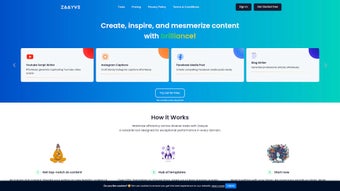
By leveraging more than 170 ready‑made templates, users can generate professional‑grade articles, trending hashtags, eye‑catching tweets, product‑focused blogs, YouTube scripts, Instagram captions, and Facebook media posts in a matter of seconds. Real‑time collaboration tools allow multiple team members to edit and comment simultaneously, turning Zaayve into a virtual content hub. A standout feature is the advanced performance analytics dashboard, which tracks engagement metrics, readability scores, and SEO friendliness, giving creators data‑driven insights to refine their output.
Additionally, the built‑in rephrase function helps improve existing copy, ensuring that even less‑experienced writers can produce high‑quality material without the need for extensive manual editing. In short, Zaayve aims to be the “Swiss Army knife” of AI writing, delivering speed, relevance, and polish across a wide array of digital channels.
Key Features & Templates That Power Your Content Strategy
- ? 170+ Pre‑Built Templates: From long‑form articles to snappy social captions, each template is optimized for a specific platform and audience.
- ? Industry‑Tailored Prompt Engine: The AI recognises sector‑specific jargon, allowing marketers in finance, fashion, tech, travel, and more to receive context‑aware suggestions.
- ? Performance Analytics Dashboard: Real‑time metrics such as engagement predictions, SEO score, readability, and sentiment analysis help you fine‑tune every piece of content.
- ? Rephrase & Enhance Tool: Upload existing copy and let Zaayve suggest alternative phrasings, tone adjustments, and structural improvements.
- ? Real‑Time Collaboration: Multiple users can work on the same document simultaneously, with comment threads, version history, and permission controls.
- ? Social Media Scheduler Integration: Directly push generated posts to major platforms (Twitter, Instagram, Facebook, LinkedIn) using built‑in scheduling.
- ? Hashtag & Trend Generator: AI scans current trends to suggest the most effective hashtags for increased visibility.
- ? YouTube Script Builder: Structured outlines, hook suggestions, and call‑to‑action prompts help creators produce engaging video scripts quickly.
- ⚙️ Custom Prompt Builder: Power users can design their own prompt structures for niche use‑cases, saving time on repetitive tasks.
- ?️ Secure Cloud Storage: All drafts and analytics are saved in encrypted cloud storage, ensuring data privacy and easy access across devices.
The breadth of features makes Zaayve more than just a text generator; it becomes an entire content ecosystem. For agencies handling dozens of clients, the template library reduces turnaround time dramatically, while the analytics suite provides measurable ROI for each campaign. Freelancers benefit from the rephrase tool, which can instantly elevate a draft to professional quality without costly editing services.
Moreover, the real‑time collaboration environment mirrors the workflow of modern remote teams, eliminating the need for external document‑sharing tools. In practice, users report a 40‑60 % reduction in content creation time, higher engagement rates thanks to data‑driven suggestions, and a noticeable boost in search engine rankings when the SEO‑focused recommendations are applied. Whether you are drafting a product launch blog post, crafting a viral tweet thread, or scripting an educational YouTube video, Zaayve’s feature set equips you with the right AI‑driven assistance at every step.
Installation, Usage & Compatibility – Getting Started on Any Device
Step‑By‑Step Installation Guide
- Visit the official Zaayve website and click the “Download for Windows / macOS / Android / iOS” button that matches your operating system.
- For desktop users, run the installer (.exe for Windows, .dmg for macOS) and follow the on‑screen prompts. macOS users may need to allow the app in System Preferences → Security & Privacy.
- Mobile users can find Zaayve in the Apple App Store or Google Play Store; tap “Install” and grant the requested permissions for storage and notifications.
- Once installed, launch Zaayve and create a free account using your email or single sign‑on (Google, Microsoft, or Apple ID).
- Complete the onboarding questionnaire, which helps the AI understand your industry, preferred tone, and typical content length.
First‑Time Usage Tips
After logging in, you’ll land on the dashboard where the 170+ templates are displayed in categorized tabs (Blog, Social Media, Video, etc.). Select a template that matches your current project, and a prompt window will appear. Type a brief description of your topic, choose the desired tone (formal, conversational, witty, etc.), and click “Generate.” Within seconds, Zaayve will produce a draft that you can edit directly in the built‑in editor.
Use the “Rephrase” button to improve any paragraph, or click “Analytics” to see a preview of SEO score, readability, and suggested hashtags. The collaboration pane on the right lets you invite teammates via email, assign roles (editor, reviewer, viewer), and start a live editing session. All changes are saved automatically to the cloud, so you can switch between desktop and mobile without losing progress.
Compatibility Across Platforms
Zaayve is built on a responsive web‑app framework, meaning it works seamlessly on Windows 10/11, macOS 10.15 and later, Android 8.0 and above, and iOS 13 and later. The desktop client offers deeper integration with local file systems, allowing you to export drafts directly to Word, PDF, or plain text formats. The mobile app provides on‑the‑go generation, perfect for quick social‑media posts or real‑time brainstorming during travel. Because the core AI runs on secure cloud servers, performance is consistent regardless of device hardware, provided you have a stable internet connection. Enterprise plans also include an on‑premises deployment option for organizations with strict data‑privacy requirements.
Pros, Cons & Frequently Asked Questions
Pros
- Extensive library of 170+ ready‑made templates saves time.
- Industry‑specific prompt engine delivers highly relevant content.
- Real‑time collaboration mirrors modern remote‑work workflows.
- Performance analytics give actionable insights for SEO and engagement.
- Cross‑platform compatibility ensures you can work on any device.
- Secure cloud storage protects intellectual property.
Cons
- Full feature set requires a paid subscription; free tier is limited.
- Reliance on internet connection; offline mode not available.
- Learning curve for advanced custom prompt builder.
- Analytics dashboard can feel overwhelming for beginners.
Frequently Asked Questions
Is Zaayve suitable for beginners with no writing experience?
Yes. The AI generates a complete draft based on a simple topic description, and the built‑in rephrase tool helps improve tone and readability, making it easy for novices to produce professional content.
Can I use Zaayve for commercial projects without additional licensing?
All paid plans include a commercial‑use license, allowing you to publish generated content on client websites, marketing campaigns, and paid media without extra fees.
How does the performance analytics dashboard improve my content?
The dashboard evaluates SEO keywords, readability, sentiment, and predicted engagement. It then offers actionable suggestions—like adding a high‑traffic keyword or adjusting sentence length—to boost visibility and audience interaction.
Is my data safe when using Zaayve’s cloud storage?
Zaayve employs end‑to‑end encryption, regular security audits, and complies with GDPR and CCPA standards, ensuring that your drafts and analytics remain private and secure.
What payment options are available for the premium subscription?
Zaayve accepts major credit cards, PayPal, and for enterprise customers, invoicing with net‑30 terms. Monthly and annual plans are offered, with a discount for yearly commitments.
Conclusion – Should You Download Zaayve Today?
Zaayve stands out in the crowded AI‑writing market thanks to its comprehensive template library, industry‑aware prompting, and data‑driven analytics. For marketers who need to churn out high‑quality content across multiple channels, the tool’s real‑time collaboration and scheduling integrations translate directly into productivity gains and higher engagement rates. While the free version is limited, the paid plans unlock the full suite of features, making Zaayve a worthwhile investment for professionals and teams alike. If you’re looking for a secure, cross‑platform solution that can handle everything from blog posts to Instagram captions while providing actionable insights, Zaayve is ready to deliver. Click the download button below, start a free trial, and experience how AI can transform your content workflow.
Download Zaayve Now – Free Trial Available
Overall Rating: 4.5/5
Pros: Rich template set, powerful analytics, seamless collaboration.
Cons: Requires internet, premium pricing for full access.



.png)



